

OPERATORS MANUAL Ver. 4.702c
10.7 Bombsight Usage
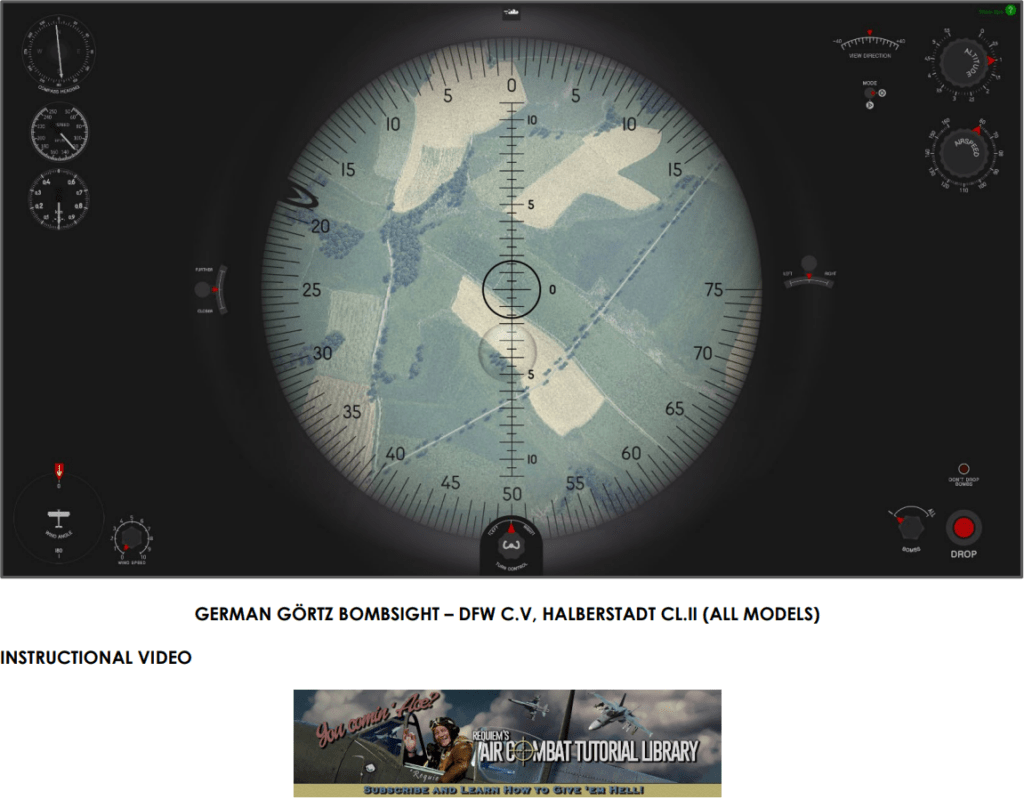
IL-2 Sturmovik: Great Battles features several aircraft that are equipped with an optical bombsight, allowing you to bomb ground targets from high altitudes. Each bombsight is modeled according to its real-world counterpart. As such, the features and controls described below will not necessarily be found on every aircraft equipped with a bombsight.
“IL-2 스트루모빅: 그레이트 배틀즈”는 고고도에서 지상 목표물을 폭격할 수 있는 광학 폭격 조준기가 장착된 여러 항공기를 특징으로 합니다. 각 폭격 조준기는 실제와 같이 모델링되었습니다. 따라서 아래에 설명된 기능과 조종 장치는 폭격 조준기가 장착된 모든 항공기에 반드시 있는 것은 아닙니다.
Note: Placing your mouse cursor over the green question mark icon at the upper right-hand corner of the screen will cause a set of tooltips to pop up, explaining in brief detail what type of function each control has and the steps needed to carry out a bombing attack.
“참고: 화면 오른쪽 상단 모서리에 있는 녹색 물음표 아이콘 위에 마우스 커서를 놓으면, 각 조종 장치의 기능 유형과 폭격 공격을 수행하는 데 필요한 단계에 대해 간략하게 설명하는 툴팁이 나타납니다.”
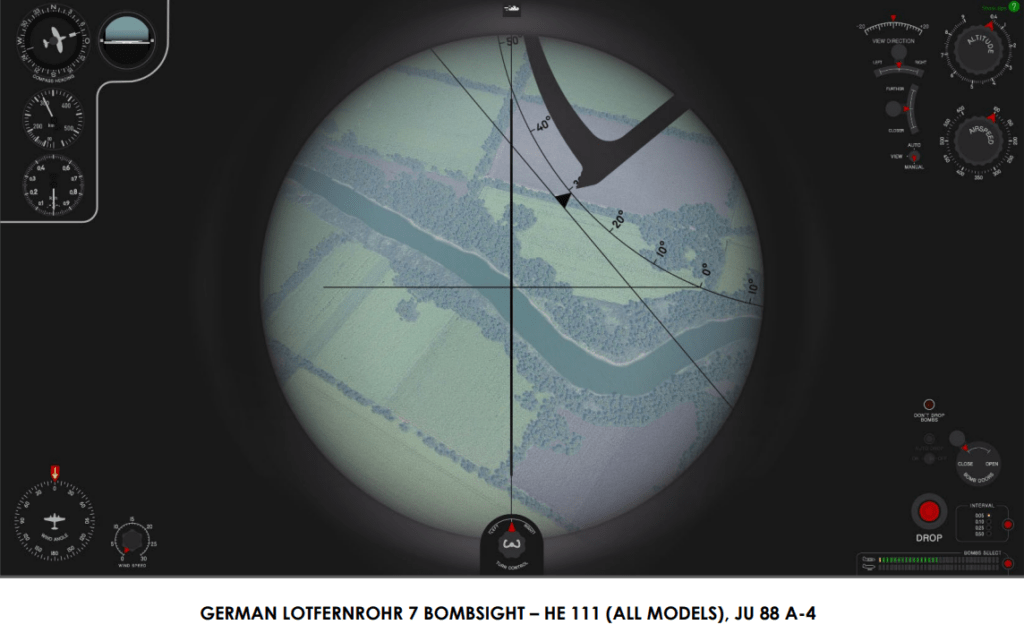
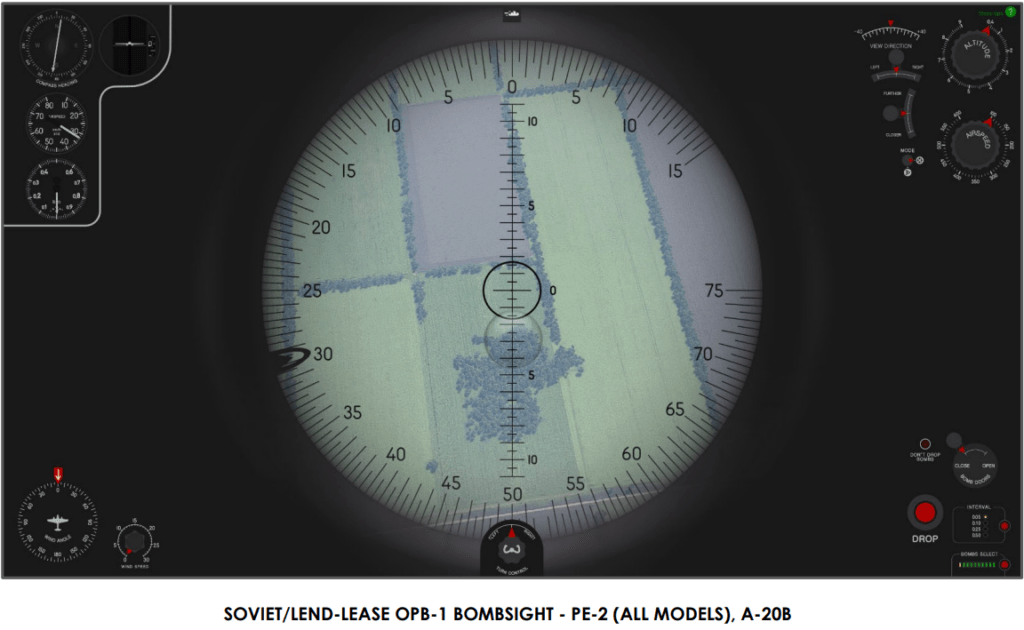
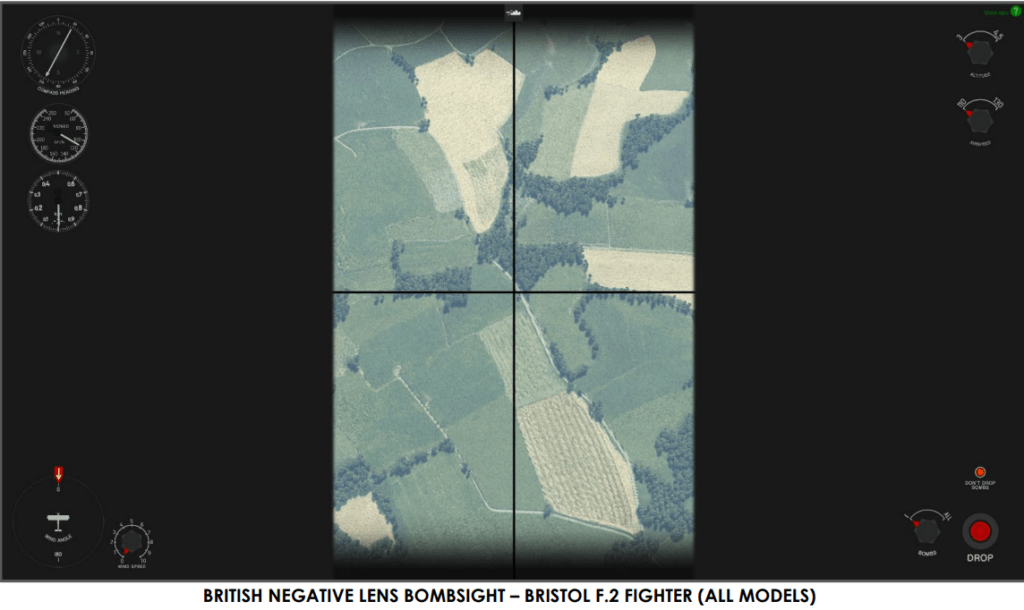
BOMBSIGHT CONTROLS AND DISPLAYS: Note: The controls and displays here are described in clockwise order, beginning with the upper left-hand corner of the screen.
“폭격 조준기 조종 장치 및 디스플레이: 참고: 여기의 조종 장치와 디스플레이는 화면의 왼쪽 상단 모서리부터 시계 방향으로 설명되어 있습니다.”
COMPASS HEADING: Displays your aircraft’s current course.
“나침반 방향: 현재 항공기의 진행 방향을 표시합니다.”
AIRCRAFT PITCH AND BANK: This shows whether your aircraft is flying straight and level.
“항공기 피치 및 뱅크: 항공기가 직진하며 수평 비행을 하고 있는지를 보여줍니다.“
AIRCRAFT AIRSPEED: Displays your aircraft’s Indicated Airspeed (IAS) in kilometers per hour.
“항공기 속도: 킬로미터/시간 단위의 항공기 지시 공기속도(IAS)를 표시합니다.”
AIRCRAFT ALTITUDE: Displays your aircraft’s altitude above sea level in meters.
“항공기 고도: 해발 고도를 미터 단위로 표시합니다.”
WEATHER REPORT: Displays the wind speed in meters per second at various altitudes (in meters) and the compass heading from which the wind is coming. This information can be toggled on and off by clicking on the icon.
“날씨 보고서: 다양한 고도(미터 단위)에서의 풍속(초당 미터 단위)과 바람이 부는 나침반 방향을 표시합니다. 이 정보는 아이콘을 클릭하여 켜고 끌 수 있습니다.”
BOMBSIGHT VIEW MODE: Sets the viewing mode of the bombsight to one of up to three possible settings (dependent on bombsight), described as follows:
“폭격 조준기 뷰 모드: 폭격 조준기의 보기 모드를 최대 세 가지 가능한 설정(폭격 조준기에 따라 다름) 중 하나로 설정합니다. 다음과 같이 설명됩니다:”
View Mode allows you to move the bombsight up & down and left & right with the View Direction controls. Your bombsight’s view angle can be adjusted either by clicking and dragging on these knobs or by scrolling your mouse wheel up and down.
“뷰 모드는 뷰 방향 조종 장치를 사용하여 폭격 조준기를 상하좌우로 움직일 수 있게 해줍니다. 폭격 조준기의 시야 각도는 이 노브를 클릭하여 드래그하거나 마우스 휠을 위아래로 스크롤하여 조정할 수 있습니다.”
Manual Mode / Bombing Mode locks in your current bombsight viewing angle. This is the mode in which you want to be when you are ready to drop your bombs with a bombsight that does not have an automatic mode (described below).
“수동 모드 / 폭격 모드는 현재의 폭격 조준기 시야 각도를 고정시킵니다. 이 모드는 자동 모드가 없는 폭격 조준기로 폭탄을 투하할 준비가 되었을 때 사용하는 모드입니다(아래에 설명됨).”
Auto Mode calculates the point at which your bombs need to be dropped, based upon the data you have entered into the bombsight and the bombsight’s viewing angle. When the Auto Drop setting is enabled while in this mode, your bombs will automatically be dropped when your aircraft reaches the calculated drop point. Auto Mode is currently only available with WWII German level bombers.
“자동 모드는 폭격 조준기에 입력한 데이터와 폭격 조준기의 시야 각도를 기반으로 폭탄을 투하해야 할 지점을 계산합니다. 이 모드에서 자동 투하 설정이 활성화되면, 항공기가 계산된 투하 지점에 도달했을 때 폭탄이 자동으로 투하됩니다. 자동 모드는 현재 2차 세계대전 독일 레벨 폭격기에서만 사용 가능합니다.”
Note: Auto Drop has no effect in View Mode and Manual / Bombing Mode.
“참고: 자동 투하는 뷰 모드와 수동 / 폭격 모드에서는 효과가 없습니다.”
BOMBSIGHT ALTITUDE: Sets your aircraft’s altitude above the target (not altitude above sea level), which is displayed in meters. The numbers represent thousands of meters, while the tick marks represent hundreds of meters.
“폭격 조준기 고도: 목표물 위의 항공기 고도(해발 고도가 아님)를 미터 단위로 설정합니다. 숫자는 수천 미터를 나타내며, 눈금은 수백 미터를 나타냅니다.”
BOMBSIGHT AIRSPEED: This dial is used to set the aircraft’s Indicated Air Speed, which is displayed in kilometers per hour. Each of the tick marks represents tens of kilometers per hour.
“폭격 조준기 속도: 이 다이얼은 항공기의 지시 공기속도를 설정하는 데 사용되며, 킬로미터/시간 단위로 표시됩니다. 각 눈금은 10킬로미터/시간을 나타냅니다.”
INVALID SETTINGS WARNING: This red light, which is marked by the text DON’T DROP BOMBS, will illuminate when your bombsight cannot be operated properly. Factors that can cause this warning light to illuminate include the following: no bombs on board the aircraft, aircraft is not flying a stable course, or when the altitude entered into the bombsight is outside the sight’s operating parameters.
“잘못된 설정 경고: ‘폭탄 투하 금지’라는 텍스트로 표시된 이 빨간색 불빛은 폭격 조준기가 제대로 작동하지 않을 때 켜집니다. 이 경고등이 켜지는 원인에는 다음과 같은 것들이 있습니다: 항공기에 폭탄이 없을 때, 항공기가 안정적인 코스를 비행하지 않을 때, 또는 폭격 조준기에 입력된 고도가 조준기의 작동 매개 변수를 벗어날 때.”
AUTO DROP: This switch controls whether your bombs will be automatically dropped when the bombsight is in Auto Mode. When enabled, a green light will illuminate. If this setting is switched off, no bombs will be dropped when your plane has reached the calculated drop point.
“자동 투하: 이 스위치는 폭격 조준기가 자동 모드일 때 폭탄이 자동으로 투하될지를 제어합니다. 활성화되면 녹색 불빛이 켜집니다. 이 설정이 꺼져 있으면, 비행기가 계산된 투하 지점에 도달했을 때 폭탄이 투하되지 않습니다.”
BOMB BAY DOOR STATUS: This shows whether your bomb bay doors are opened or closed. Clicking on the circle above the red arrow opens and closes the doors. You can also open and close your bomb bay doors with the N key (Bomb bay doors toggle).
“폭탄 창고 문 상태: 폭탄 창고 문이 열렸는지 닫혔는지를 보여줍니다. 빨간 화살표 위의 원을 클릭하면 문이 열리고 닫힙니다. N 키(폭탄 창고 문 전환)를 사용하여 폭탄 창고 문을 열고 닫을 수도 있습니다.”
BOMB DROP BUTTON: This button will release your aircraft’s bombs in View Mode and Manual / Bombing Mode. The number of bombs released with each press of the button is dependent on how many bombs you have selected with the Bomb Selector feature (described below).
“폭탄 투하 버튼: 이 버튼은 뷰 모드와 수동 / 폭격 모드에서 항공기의 폭탄을 투하합니다. 버튼을 누를 때마다 투하되는 폭탄의 수는 폭탄 선택기 기능(아래에 설명됨)으로 선택한 폭탄의 수에 따라 달라집니다.”
BOMB RELEASE INTERVAL: This shows the amount of time that will elapse between each bomb being dropped, in seconds. Clicking on the red button will cycle through the various options. Choose a lower value if you want your bombs to detonate in a small area, and likewise choose a larger value if you want your bombs to be dropped over a larger area. For this feature to work, you must have multiple bombs selected to be released at one time. You can also adjust this feature with the Left Ctrl + B key combination (Drop bombs delay toggle).
“폭탄 투하 간격: 이것은 각 폭탄이 투하되는 사이의 시간을 초 단위로 보여줍니다. 빨간 버튼을 클릭하면 다양한 옵션을 순환합니다. 폭탄이 작은 영역에서 폭발하기를 원하면 낮은 값을 선택하고, 폭탄이 더 넓은 영역에 투하되기를 원하면 더 높은 값을 선택하세요. 이 기능을 사용하려면 한 번에 여러 폭탄을 선택해 놓아야 합니다. 또한 Left Ctrl + B 키 조합(폭탄 투하 지연 전환)을 사용하여 이 기능을 조정할 수 있습니다.”
BOMB SELECTOR: Shows the number of bombs onboard your aircraft (symbolized by green rectangles) and the number of bombs you have selected for release (symbolized by yellow rectangles). You can change the number of bombs selected for release by clicking on the red button. You can also adjust your bomb release settings with the Left Windows + B key combination (Drop bombs mode toggle).
“폭탄 선택기: 항공기에 탑재된 폭탄의 수(녹색 사각형으로 표시됨)와 투하할 폭탄의 수(노란색 사각형으로 표시됨)를 보여줍니다. 빨간 버튼을 클릭하여 투하할 폭탄의 수를 변경할 수 있습니다. 또한 Left Windows + B 키 조합(폭탄 투하 모드 전환)을 사용하여 폭탄 투하 설정을 조정할 수 있습니다.”
AIRCRAFT DIRECTIONAL ADJUSTMENT: This control allows you to alter your aircraft’s course by making shallow turns to the left and the right. This control can also be used with the Left Shift + Z (Level flight AI-autopilot: left turn) and the Left Shift + X (Level flight AI-autopilot: right turn) key combinations.
“항공기 방향 조절: 이 조종 장치를 사용하면 좌우로 완만한 회전을 하여 항공기의 코스를 변경할 수 있습니다. 이 조종 장치는 Left Shift + Z(수평 비행 AI-자동조종사: 좌회전) 및 Left Shift + X(수평 비행 AI-자동조종사: 우회전) 키 조합과 함께 사용할 수도 있습니다.”
WIND DIRECTION ADJUSTMENT: Sets the direction from which the wind is blowing. Wind direction is indicated in degrees.
“풍향 조절: 바람이 불어오는 방향을 설정합니다. 풍향은 도 단위로 표시됩니다.”
WIND SPEED ADJUSTMENT: Sets the speed at which the wind is blowing. Wind speed is indicated in meters per second.
“풍속 조절: 바람이 부는 속도를 설정합니다. 풍속은 초당 미터 단위로 표시됩니다.”

EXECUTING A BOMBING RUN:
폭격 수행:
While the bombsight controls in IL-2 Sturmovik: Great Battles vary depending on the aircraft to which they are fitted, the following procedures will help you hit your target:
“IL-2 스트루모빅: 그레이트 배틀즈”에서 폭격 조준기 조종 장치는 장착된 항공기에 따라 다르지만, 다음 절차는 목표를 정확히 맞히는 데 도움이 됩니다:
- To access the bombsight, press the V key (Bombsight). This will cause the Level Autopilot feature to be automatically engaged (if your aircraft is flying a reasonably stable course).
폭격 조준기에 접근하려면 V 키(폭격 조준기)를 누릅니다. 이것은 항공기가 안정적인 코스를 비행하고 있다면 수준 자동 조종 기능이 자동으로 작동되게 할 것입니다.
- If applicable, adjust the wind direction and wind speed dials. To input wind direction, subtract the direction from which the wind is blowing from your aircraft’s course. For example, if your aircraft’s course is 350 degrees and the wind is blowing from 270 degrees, the wind is blowing 80 degrees from the left. Thus, you would rotate the dial 80 degrees to the left (counterclockwise).
가능한 경우, 풍향과 풍속 다이얼을 조정합니다. 풍향을 입력하기 위해, 바람이 불어오는 방향을 항공기의 진행 방향에서 빼세요. 예를 들어, 항공기의 진행 방향이 350도이고 바람이 270도에서 불어온다면, 바람은 왼쪽에서 80도 불고 있습니다. 따라서, 다이얼을 왼쪽으로 80도(반시계 방향으로) 회전시킵니다.
- Input your aircraft’s Indicated Air Speed with the Bombsight Airspeed dial and your aircraft’s altitude with Bombsight Altitude dial. Note that this altitude is your height above the target and not your height above sea level (as indicated by your altimeter). For example, if your bombsight’s altimeter reads 2,000 meters and your target is 100 meters above sea level, the altitude you would enter in the bombsight is 1,900 meters. If you are flying a bombing mission in campaign mode, your target’s altitude will be noted in the mission briefing.
폭격 조준기 속도 다이얼로 항공기의 지시 공기속도를 입력하고 폭격 조준기 고도 다이얼로 항공기의 고도를 입력하세요. 이 고도는 목표물 위의 높이이며 해발 고도(고도계가 나타내는)가 아님을 주의하세요. 예를 들어, 폭격 조준기의 고도계가 2,000미터를 나타내고 목표물이 해발 100미터에 있다면, 폭격 조준기에 입력할 고도는 1,900미터입니다. 캠페인 모드에서 폭격 임무를 수행하는 경우, 목표물의 고도는 임무 브리핑에서 언급될 것입니다.
- Ensure your bomb bay doors are open and select the number of bombs you want to release. Once this is done, adjust the Bomb Release Interval setting as necessary.
폭탄 창고 문이 열려 있는지 확인하고 투하하려는 폭탄의 수를 선택하세요. 이 작업을 마치면 필요에 따라 폭탄 투하 간격 설정을 조정하세요.
- Adjust your aircraft’s course as necessary with the Aircraft Directional Adjustment feature (or with the Level flight AI-autopilot: left turn and Level flight AI-autopilot: right turn commands). If you use the Aircraft Directional Adjustment feature for this procedure, you do not need to hold down your mouse button once you have initiated a turn.
항공기 방향 조정 기능(또는 수평 비행 AI-자동조종사: 좌회전 및 수평 비행 AI-자동조종사: 우회전 명령)을 사용하여 필요에 따라 항공기의 코스를 조정하세요. 이 절차에서 항공기 방향 조정 기능을 사용하는 경우, 회전을 시작한 후에 마우스 버튼을 계속 누르고 있을 필요가 없습니다.
- Switch your bombsight to View Mode, and then adjust the bombsight up and down as necessary with the Bombsight View Angle feature to line up the target with the crosshairs of your bombsight.
폭격 조준기를 뷰 모드로 전환한 다음, 폭격 조준기 시야 각도 기능을 사용하여 필요에 따라 폭격 조준기를 위아래로 조정하여 목표물을 폭격 조준기의 십자선과 일치시키세요.
- If flying the Pe-2, A-20, or the Halberstadt CL.II, ensure the floating bubble is in the center of the bombsight. If necessary, adjust the bombsight’s airspeed and altitude settings to bring this bubble to its correct position. It may also be necessary to throttle up or down your aircraft’s engines.
Pe-2, A-20 또는 Halberstadt CL.II를 조종하는 경우, 부유 버블이 폭격 조준기의 중앙에 있는지 확인하세요. 필요한 경우, 폭격 조준기의 속도와 고도 설정을 조정하여 이 버블을 올바른 위치로 가져오세요. 또한 항공기 엔진의 스로틀을 올리거나 내릴 필요가 있을 수 있습니다.
- Switch the bombsight back to Manual/Bombing Mode (if flying the Pe-2, A-20, or the Halberstadt CL.II) or to Auto Mode (if flying a German bomber) once you are satisfied with the bombsight’s settings and have lined up the target in the bombsight’s crosshairs.
폭격 조준기의 설정에 만족하고 목표물을 폭격 조준기의 십자선과 일치시킨 후에 폭격 조준기를 수동/폭격 모드(만약 Pe-2, A-20 또는 Halberstadt CL.II를 조종하는 경우) 또는 자동 모드(독일 폭격기를 조종하는 경우)로 다시 전환하세요.
- When the target passes under the crosshairs of the bombsight and with the bombsight in Manual/Bombing Mode, release your bombs with the Bomb Drop button. If the bombsight is in Auto Mode, your bombs will be automatically dropped at the calculated drop point. Once you have dropped all your bombs, the Invalid Settings Warning light will light up.
목표물이 폭격 조준기의 십자선 아래로 지나가고 폭격 조준기가 수동/폭격 모드에 있을 때, 폭탄 투하 버튼으로 폭탄을 투하하세요. 폭격 조준기가 자동 모드에 있으면, 폭탄은 계산된 투하 지점에서 자동으로 투하됩니다. 모든 폭탄을 투하한 후에는 잘못된 설정 경고등이 켜질 것입니다.
- To exit the bombsight view, press the V key again
폭격 조준기 뷰를 종료하려면 다시 V 키를 누르세요.



폭격조준기 메뉴얼